
What is FIRE?
FIRE (Fast Intent-Run Engineering) is an Adaptive Spec-Driven Development flow with first-class Monorepo and Brownfield support. It kills the ceremony and right-sizes the rigor—because fixing a UI bug isn’t the same as refactoring your payment gateway.Check when necessary, not check everything. FIRE dynamically decides when to ask for human input and when to burn through the task, saving your attention for moments that actually matter.
Key Differentiators
Dynamic Execution
No pre-planned execution. Builder scans remaining work items and recommends what to run next based on dependencies and current state.
Adaptive Checkpoints
0-2 checkpoints per work item based on complexity. Autopilot for simple tasks, Validate for critical changes.
First-Class Brownfield
Auto-detects existing patterns, respects conventions, and extends rather than rewrites your codebase.
Monorepo Support
Hierarchical standards with module-specific overrides. One project, multiple tech stacks.
Walkthrough Generation
Every change documented automatically. Review what AI did without digging through code.
Change-Friendly
Requirements changed? Just update your specs. No execution plans to re-create—next run adapts automatically.
FIRE vs AI-DLC (specs.md)
FIRE and specs.md’s AI-DLC flow share intent-driven philosophy but are distinct flows. FIRE prioritizes adaptive execution; our AI-DLC implementation prioritizes comprehensive traceability.| Aspect | FIRE | specs.md AI-DLC |
|---|---|---|
| Philosophy | Intent-driven, AI proposes, human validates | Same |
| Hierarchy | Intent → Work Item → Run | Intent → Unit → Story → Bolt → Stages |
| Execution Planning | Dynamic—Builder recommends next run | Pre-planned—Bolts created before execution |
| Requirement Changes | Just update specs, next run adapts | May require re-planning bolts |
| Checkpoints | Adaptive (based on complexity + config) | Comprehensive (fixed per bolt type) |
| Agents | 3 (Orchestrator, Planner, Builder) | 4 (Master, Inception, Construction, Operations) |
| Artifacts | Adaptive (design docs when needed) | Comprehensive (per bolt type) |
| Phases | Plan → Execute (continuous) | Inception → Construction → Operations (sequential) |
| Design Approach | Adaptive based on complexity | DDD or Simple bolt types |
| Optimized For | Teams who hate friction | Teams needing full traceability |
Shared philosophy: Both flows use intents, structured artifacts, and human validation. FIRE adapts the ceremony to the task; AI-DLC provides comprehensive ceremony always.
Dynamic vs Pre-Planned Execution
This is a fundamental difference in how the two flows handle execution: FIRE (Dynamic): When you invoke the Builder agent, it scans all remaining intents and work items, analyzes their dependencies, and recommends which work items can run together next. You approve or adjust, then it executes. No execution plans are created ahead of time. AI-DLC (Pre-Planned): During the Inception phase, you create “bolts”—pre-defined execution plans that bundle stories together with specific stages. Bolts are planned before construction begins.When to Use FIRE
You hate unnecessary friction
You hate unnecessary friction
FIRE is built for collectives—tight-knit teams and solo devs who want to ship without bureaucracy getting in the way.
You're working in a brownfield codebase
You're working in a brownfield codebase
FIRE analyzes your existing structure. It respects the patterns you already have and extends rather than rewrites.
You have a monorepo
You have a monorepo
Hierarchical standards support different tech stacks per module while sharing common policies.
You want adaptive rigor
You want adaptive rigor
Simple tasks burn through fast. Complex changes get the attention they deserve. FIRE right-sizes the ceremony.
Your project doesn't always need DDD
Your project doesn't always need DDD
If your project doesn’t need complex domain modeling, FIRE won’t force it. Design docs appear when complexity warrants them.
When to Consider specs.md AI-DLC Instead
specs.md’s AI-DLC flow may be a better fit if:
- You need comprehensive documentation for every change (regulatory/audit requirements)
- Your organization mandates fixed approval workflows
- You prefer predictable ceremony over adaptive execution
Core Concepts
Intent
A high-level objective that delivers user value. Captured through guided conversation, not lengthy specs.Work Item
A discrete, executable unit of work derived from an Intent. Each work item completes in a single Run.Run
A single execution cycle for a work item. Loads context, executes per mode, tracks changes, generates walkthrough.Walkthrough
Generated after each run. Documents what changed, why, and how to verify it.Adaptive Execution
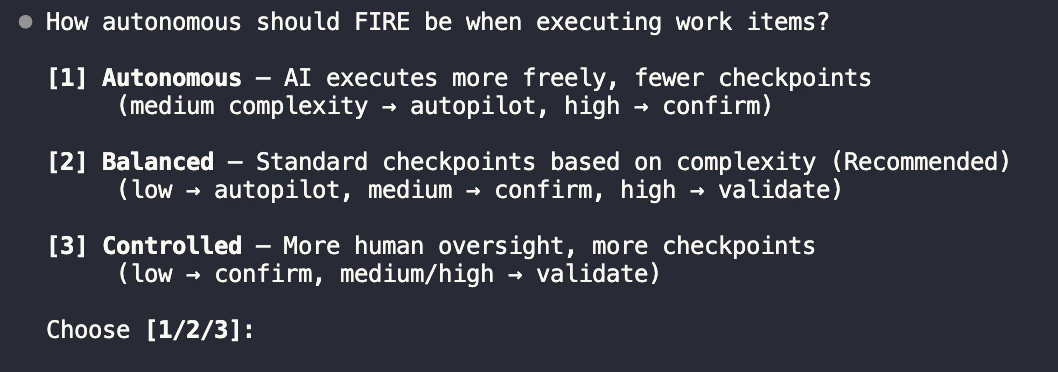
FIRE doesn’t guess—it analyzes two inputs to decide the execution path:- Work Complexity: Is this a simple tweak or a systemic change?
- Your Autonomy Config: How much oversight do you want?
| Mode | Checkpoints | Use For |
|---|---|---|
| Autopilot | 0 | Bug fixes, minor updates, well-defined changes |
| Confirm | 1 (plan) | Standard features, moderate complexity |
| Validate | 2 (design + plan) | Security, payments, core architecture |
Execution Modes
Learn how Autopilot, Confirm, and Validate modes work with detailed flow diagrams
Project Structure
Get Started
Quick Start Guide
Step-by-step guide to shipping your first feature with FIRE